CareCam Pro
- 4.4
- Rating
- 1.00M
- Installs
- Free
- Price

 Analysis by App-foxy
I approached CareCam Pro as a practical home-security tool rather than something I would open for entertainment. Its purpose is straightforward: help me keep an eye on a home through a camera-based setup, with the phone acting as the place where I check what is happening. That simplicity is part of its appeal. I do not need a complicated smart-home dashboard just to see whether a room is quiet, a child has arrived home, or a pet is behaving normally.
The app is developed by Care Home and is available free of charge, which makes it easy to try before committing to a more elaborate security platform. It has built a sizeable audience, with more than a million installs and an average rating of 4.4 from roughly 33 thousand ratings. Those figures suggest that the basic idea works for many people, although they should not be mistaken for a guarantee that every camera or household will deliver the same experience.
How I use CareCam Pro in a normal day
My baseline workflow with an app like this starts before I need it. I would install CareCam Pro on a compatible Android device, connect it to the camera arrangement, and spend a few minutes checking that the live view is actually usable from the places where I normally carry the phone. A security app is only helpful when the camera is positioned well and the viewing routine is familiar.
You May Also Like

 Blood Strike: 2.5 Anniversary
Blood Strike’s Loadouts Turn Every Drop Into a Tactical Gamble
A close look at Blood Strike’s custom loadouts: how fast access to signature weapons reshapes its battle royale rhythm, rewards preparation, and narrows the gap between fights.

 Pandora - Music & Podcasts
Pandora’s Music Is Easy to Start, but Harder to Recover
Pandora’s strength is its low-effort path from a seed to a station. Its weak spot is how much confidence it asks you to place in connection, setup, and quiet recovery.

 8 Ball Pool
 Is Built on Rivalries, Rematches, and Routine
A close look at the rivalries, rematches, shared routines, and unanswered safety questions that turn a quick pool match into a persistent mobile community.

 Samsung Music
’s Quiet Strength Is Playing What You Already Own
Its reach comes less from spectacle than from dependable access to a personal library. That simplicity is both the app’s strongest retention engine and its ceiling.

 AccuWeather: Weather Radar
AccuWeather Review: A Quick, Clear Forecast for Everyday Decisions
For everyday plans, the best forecast is the one you can understand quickly. AccuWeather makes rain timing, radar, and local conditions easy to act on, with a few trade-offs.

 Hill Climb Racing
Why Hill Climb Racing Still Turns Crashes Into One More Run
A tiny car, a bumpy hill and one more upgrade: Hill Climb Racing keeps resurfacing because its simple chaos makes every near-miss feel personal.
More From Our News Desk



For a typical evening, I might use the live view to check an entrance, a living room, or another area that deserves occasional attention. I prefer short, purposeful checks instead of leaving the app open constantly. That habit reduces distraction and makes it easier to notice when something is genuinely unusual. It also avoids treating a phone screen as a replacement for sensible locks, lighting, and awareness of the property.
A realistic example would be leaving home while a pet remains indoors. I can check the relevant room after arriving at work, confirm that the space looks normal, and close the app again. If I am waiting for a delivery or expecting a family member, the same routine gives me a quick visual confirmation without walking back through the house. The value is not in watching every second; it is in making occasional checks convenient.
I found that the most important first step is deciding what each camera is supposed to answer. One camera might answer, “Is the front area clear?” Another might answer, “Is the child in the playroom?” If I position a camera without a specific question in mind, the view can be technically active but practically unhelpful. A wide image may show more of a room while making important details too small to interpret.
CareCam Pro fits best when I want a focused monitoring routine. It is less appealing if I expect a complete home-automation command center, professional alarm response, or a long list of integrations. Its store summary presents it as a home-security system, but I would still think of it primarily as a camera companion for personal observation and remote checking.
What I check before trusting the view
I do not assume that a successful installation means the system is ready for everyday use. I check the camera angle at different times of day, especially when sunlight enters the room or an outdoor area becomes dark. A view that looks clear in the afternoon may become difficult to interpret at night. This is not a flaw unique to CareCam Pro, but it is an important limit of relying on any phone-based camera viewer.
I also test the app from the location where I am most likely to use it. Checking from beside the camera proves very little. A better test is to use the phone from another room, outside the property, or on the network I normally use away from home. That gives me a more realistic sense of whether the workflow is convenient enough for a genuine emergency or routine check.
Another useful habit is keeping the camera’s purpose narrow. I would avoid pointing it at a private area where continuous monitoring would feel intrusive. For shared homes, I would explain where the camera is and why it is there. CareCam Pro can make viewing easier, but it cannot solve the trust and privacy decisions that come with placing a camera in a living space.
Settings worth checking instead of accepting defaults
The settings deserve more attention than they usually receive. I would begin with account and device access, making sure the phone I use most often is the one prepared for monitoring. If several people need access, I would establish a simple household rule about who checks the camera and when, rather than having everyone open it randomly. A predictable routine is easier to manage than a collection of informal habits.
I would then review any available viewing, notification, and device options shown by the installed version. The current version is 2.9.36, and menus can change over time, so I would not rely on an old tutorial that describes buttons no longer present. The practical lesson is to read each option in the app itself and test its effect immediately, especially if it changes when the phone alerts me.
Notifications are worth treating carefully. Too many alerts can train me to dismiss them without looking, while too few can make the system feel pointless. I prefer a notification approach that matches the camera’s job. A camera used for occasional pet checks should not create the same level of urgency as one watching an entrance. If the app offers different alert controls, I would adjust them according to that distinction rather than enabling everything.
There is also a useful difference between a camera that is checked manually and one that is expected to draw attention automatically. Manual viewing works well when I already know when to look. Automatic alerts are more helpful when I cannot maintain a schedule. The trade-off is that alerts depend on the camera’s view, lighting, placement, and the app’s available controls. I would test them during ordinary household activity before trusting them for anything important.
Because CareCam Pro is rated for Everyone, it is approachable for a broad household audience. That does not mean every setup decision is suitable for a child or an inexperienced user. I would keep account control with a responsible adult and explain that the app shows a camera view, not a promise that every event will be detected or recorded.
Shortcuts and repeatable patterns that save time
Experienced use is less about tapping quickly and more about removing unnecessary decisions. I like to keep a repeatable inspection order: entrance first, then the room where a pet or child spends time, then any area that is normally empty. Following the same order helps me notice changes and prevents me from forgetting the camera that matters most.
If the app presents multiple camera views, I would give each one a memorable purpose rather than relying on vague labels. “Front door” or “pet room” is more useful in a hurry than a generic device name. Clear naming is a small improvement, but it matters when I am checking the phone while distracted or trying to guide another family member through the same screen.
I also recommend creating a short check routine for leaving and returning home. Before leaving, I confirm that the camera is aimed correctly and that the phone can reach the view. After returning, I close the monitoring session when I no longer need it. This avoids turning security into background noise and makes the app part of a deliberate habit rather than an always-open screen.
For a holiday or a long day away, I would ask a trusted person to perform a physical check as well. Remote viewing is useful for confirming what the camera can see, but it cannot inspect a different room, reset a device that has lost power, or respond to a real problem. This is one of the most important trade-offs: CareCam Pro can extend awareness, but it does not replace a human backup.
Another practical pattern is testing the system after changing the camera’s position. Even a small movement can hide an entrance or introduce glare. I would make the change, open the app from the usual remote location, and confirm that the important area is still visible. That simple before-and-after check is more valuable than assuming the old setup remains correct.
Where the app reaches its limits
My main reservation is that a camera app can feel more complete than it really is. Seeing a live image may create confidence, but the image only covers one angle at one moment. It cannot tell me what happened outside the frame, whether a quiet room contains a hidden problem, or whether the camera itself has stopped being useful.
I would therefore avoid presenting CareCam Pro as a substitute for a professionally monitored security service. If I needed emergency dispatch, dedicated alarm hardware, broad property coverage, or formal business security procedures, I would choose a specialized solution instead. CareCam Pro makes more sense for personal awareness and everyday reassurance than for high-risk protection.
There is also a connectivity dependency. Remote camera viewing requires the camera arrangement and the phone to communicate successfully. If the home network, device power, or phone connection is unreliable, the experience can become frustrating at exactly the wrong time. I would keep a physical backup plan, such as a trusted neighbor or family member, rather than assuming the app will always be reachable.
The free entry point is attractive, but the presence of in-app purchases ranging from $0.99 to $299.99 per item means I would pay attention before confirming any optional purchase. I would first decide whether the free experience covers my actual routine and then examine what an upgrade changes. A higher price can be reasonable for a feature I genuinely need, but I would not buy simply because a security app makes the purchase feel urgent.
This is also where CareCam Pro differs from alternatives. A basic camera viewer is often easier to understand and cheaper to maintain than a large smart-home platform. On the other hand, a dedicated security ecosystem may offer stronger automation, more hardware choices, or clearer professional support. I would choose CareCam Pro when the priority is accessible camera viewing, and I would look elsewhere when I need a coordinated alarm, sensors, door access, and formal response in one system.
People who dislike adjusting camera placement or checking connection reliability may find the app more work than expected. It is not a “set it once and forget it” solution in the meaningful sense of home security. The device still needs a sensible position, the phone still needs to be usable, and the household still needs a plan for what to do after seeing something concerning.
Who will benefit most from CareCam Pro
I think CareCam Pro is a good match for renters, families, pet owners, and anyone who wants a straightforward way to check a camera from a phone. It is especially suitable for someone who values quick visual confirmation over a complicated control panel. The free price makes experimentation easier, while the Everyone age rating keeps the product broadly approachable.
It can also suit a small household that wants one shared routine. For example, one person can check the entrance after work, another can look in on a pet during the day, and both can follow the same camera naming and inspection order. The app becomes more useful when everyone understands its role instead of treating it as a mysterious technical system.
I would skip it if my priority were a complete professional-grade security package or if I wanted extensive smart-home automation before doing any setup work. I would also reconsider it if the camera placement required constant monitoring of private spaces, since the convenience would not outweigh the privacy concerns. In those cases, a different security approach may be more appropriate.
My verdict after building a routine around it
CareCam Pro is most convincing when I use it as a focused camera-checking tool, not as a replacement for every part of home security. Its strengths are convenience, an approachable free starting point, and a workflow that can fit naturally into leaving home, checking on a pet, or confirming that an area looks normal.
I appreciate that it can serve both occasional users and people willing to build a more disciplined routine. Clear camera purposes, sensible notification choices, regular remote tests, and a human backup make a much bigger difference than simply installing the app. Those habits also expose its limits honestly: the app can show me what the camera sees, but it cannot guarantee coverage, connectivity, or a response.
Care Home has kept the product in the tools category, and that feels accurate. I would recommend trying it to someone who already has a compatible camera setup and wants a direct way to monitor it from Android. I would be more cautious with anyone expecting a full alarm service or a broad smart-home command center. For the right household, though, CareCam Pro is a practical addition whose value comes from consistent use rather than flashy complexity.
With its release dating back to July 3, 2020, and its current version at 2.9.36, it has had time to become an established option rather than a brand-new experiment. I would still review the app’s current controls after installation and make a small test before relying on it. Used with realistic expectations, it gives me useful remote awareness while leaving the important security decisions where they belong: with the people, hardware, and backup plans around it.
FAQs for CareCam Pro
01What is CareCam Pro and what can I use it for?
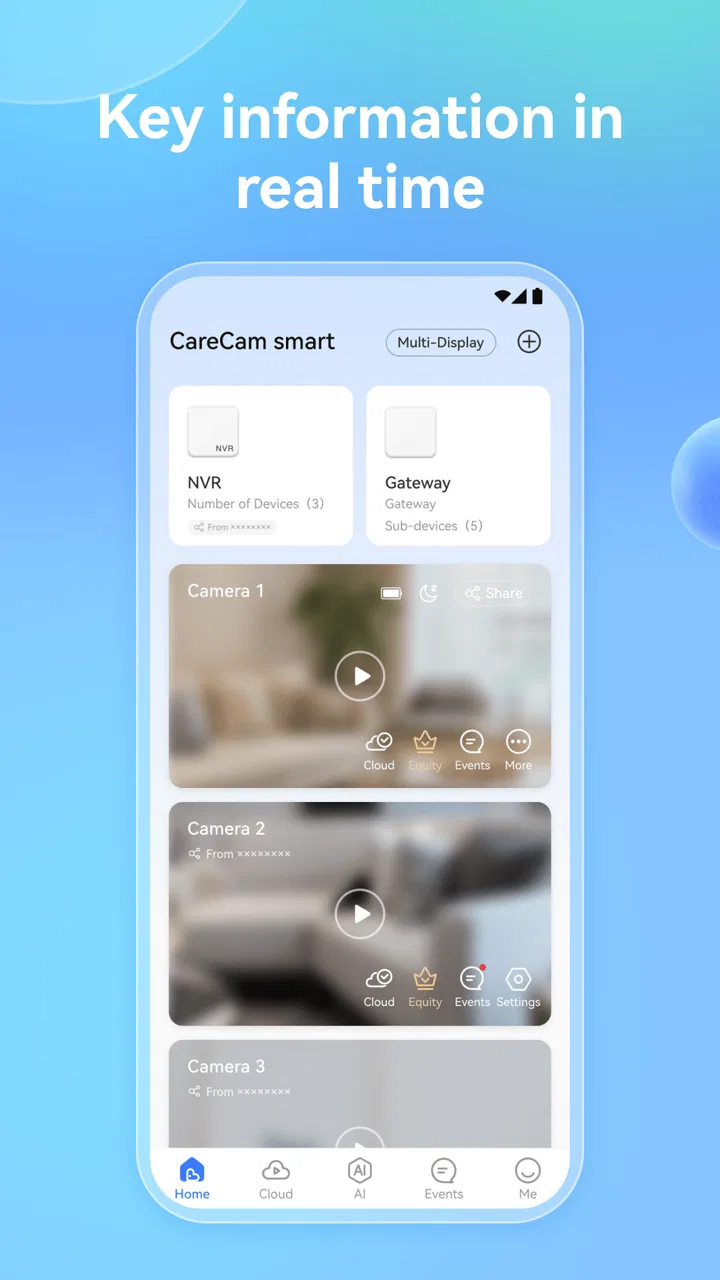
CareCam Pro is a mobile companion app designed to connect with compatible security cameras and monitoring devices. After pairing the camera, you can generally use the app to view live video, check activity remotely, receive motion alerts, and review recorded footage, depending on the camera model and subscription features. Its exact functions may vary between devices, so checking compatibility before installation is important.
02How do I connect CareCam Pro to my security camera?
To set up CareCam Pro, install the app, create or sign in to an account, and follow the on-screen pairing instructions for your camera. Most devices require a stable Wi-Fi connection, location or Bluetooth permissions during setup, and access to the camera’s QR code or device ID. Keep the camera near your router initially, because weak Wi-Fi can interrupt pairing and cause setup failures.
03Does CareCam Pro work without an internet connection?
CareCam Pro normally relies on an internet connection for remote viewing, cloud notifications, account synchronization, and access while you are away from home. The camera may continue recording locally if it supports a memory card, but the app’s remote features can be unavailable during an outage. Performance also depends on both the camera’s connection and the phone’s mobile data or Wi-Fi.
04Is CareCam Pro free to use, or does it require a subscription?
The application may be available to download without an upfront fee, but some cameras or advanced functions can require additional equipment, in-app purchases, or a cloud storage subscription. Features such as longer video history, expanded storage, intelligent alerts, or multiple-camera support may depend on the manufacturer’s plan. Review the pricing and trial terms shown in the app before activating paid services.
05Is CareCam Pro safe for monitoring children, pets, or my home?
CareCam Pro can be useful for checking a home, child’s room, pet area, or another monitored space, but it should not replace appropriate supervision or an approved emergency security system. Use a strong, unique password, enable available account protection, keep the camera firmware and app updated, and limit shared access. Avoid placing cameras where people reasonably expect privacy, and review permissions carefully.
Pros
- Remote live viewing with smooth video on compatible connections.
- Motion alerts help monitor activity around your home.
- Supports two-way audio for quick communication.
- Night vision keeps the camera useful in low-light conditions.
- Multiple camera support simplifies monitoring several locations.
Cons
- Some features may require a subscription or compatible camera hardware.
- Video quality depends heavily on your internet connection.
- Notifications can become frequent when motion sensitivity is high.
- Initial camera pairing may take a few attempts.
- Privacy concerns require careful password and access management.

CareCam Pro
Gallery